
How to Bypass iCloud Locked iPhone 14

Getting locked out of an iPhone due to an iCloud activation lock can be frustrating. However, with the right tools and proper guidance, the process of regaining access can become much easier. In this article, we will explain what an iCloud lock is, introduce the iRemoval Pro Tool, and provide a step-by-step guide to help you unlock an iCloud-locked iPhone 14.
Understanding iCloud Lock
The iCloud Activation Lock is a security feature developed by Apple to protect user data if an iPhone is lost or stolen. When the “Find My iPhone” feature is enabled, the device requires the original Apple ID and password before it can be activated after a reset.
Sometimes users forget their Apple ID credentials, or they purchase a second-hand iPhone that is still connected to the previous owner’s iCloud account. In such situations, the device becomes locked and cannot be used normally.
Understanding how iCloud lock works and why it happens is important before attempting any unlocking process.
Introduction to iRemoval Pro Tool
The iRemoval Pro Tool is designed to help users bypass iCloud activation locks on supported devices. It offers several advanced features that make the unlocking process easier and more efficient.
The tool has become popular because of its user-friendly interface and compatibility with multiple iPhone models and iOS versions.
Supported Devices and iOS Versions
The iRemoval Pro Tool supports a wide range of iPhone models, including:
iPhone XR
iPhone XS / XS Max
iPhone SE2 / SE3
iPhone 11 / 11 Pro / 11 Pro Max
iPhone 12 / 12 Pro / 12 Pro Max
iPhone 13 / 13 Mini / 13 Pro / 13 Pro Max
iPhone 14 / 14 Plus / 14 Pro / 14 Pro Max
Supported iOS versions include:
iOS 15
iOS 16
iOS 16.6.1
Support for iOS 17, iOS 17.3.1, iOS 17.4, iOS 17.4.1, iOS 17.5 and iOS 18 is expected in upcoming updates.
Currently, the iPhone 15 series (iPhone 15, 15 Plus, 15 Pro, and 15 Pro Max) is not supported.
Step-by-Step Guide to Use iRemoval Pro Tool
Step 1: Download and Install the Tool
First, download the iRemoval Pro Tool on your computer and install it by following the provided instructions.
Required downloads may include:
iRemoval PRO v6.6.1 (iRa1n v4.5)
iRemoval PRO Premium Edition
iBypass Lpro V2.0 Windows:
iTunes
Step 2: Connect Your iPhone
Use a USB cable to connect your iPhone 14 to the computer. Make sure the connection is stable so the software can detect the device properly.
Step 3: Start the Unlock Process
Open the iRemoval Pro Tool and follow the instructions displayed on the screen. The software will automatically detect your device and begin the iCloud unlocking process.
Step 4: Confirm the Unlock
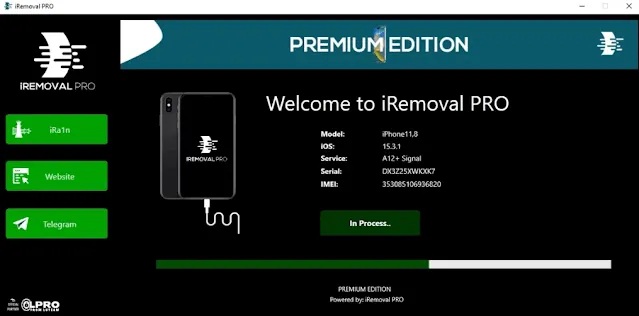
Once the process is finished, check your device to confirm that the iCloud activation lock has been removed. Your iPhone should now be accessible.
Common Problems and Solutions
While performing the unlocking process, some users may encounter issues such as:
Device not detected by the software
Driver or iTunes compatibility problems
Unstable USB connections
If these problems occur, ensure all required drivers are installed and that the connection between the device and computer is stable.
Tips to Prevent iCloud Lock in the Future
To avoid iCloud lock problems in the future, follow these best practices:
Keep your Apple ID and password stored safely.
Disable Find My iPhone before resetting your device.
If buying a used iPhone, ensure the previous owner has removed their iCloud account.
Regularly back up your data.
User Experiences
Many users report positive experiences using the iRemoval Pro Tool. Testimonials and reviews indicate that the tool can successfully bypass activation locks on supported devices when used correctly.
Frequently Asked Questions (FAQs)
What is iCloud Lock?
iCloud Lock is a security feature that prevents unauthorized access to an iPhone when Find My iPhone is enabled.
Is using an iRemoval tool legal?
It may be acceptable if the device belongs to you and you are the legitimate owner.
Can iCloud lock be removed without tools?
Some manual methods exist, but professional tools are generally more reliable.
How long does the unlocking process take?
The duration depends on the device and system, but the process usually completes within a short time.
Are there risks when using iRemoval tools?
When used correctly and according to instructions, the risks are minimal.
Conclusion
Being locked out of your iPhone can be extremely frustrating. Fortunately, tools like iRemoval Pro Tool offer a practical way to address iCloud activation lock issues on supported devices.
By carefully following the steps outlined above, you may be able to regain access to your iPhone 14 and use it normally again.